
CRM Training Matrix
Managing your CRM configuration and training requires proper planning. To help with this, we’ve created a simple CRM Training Matrix.
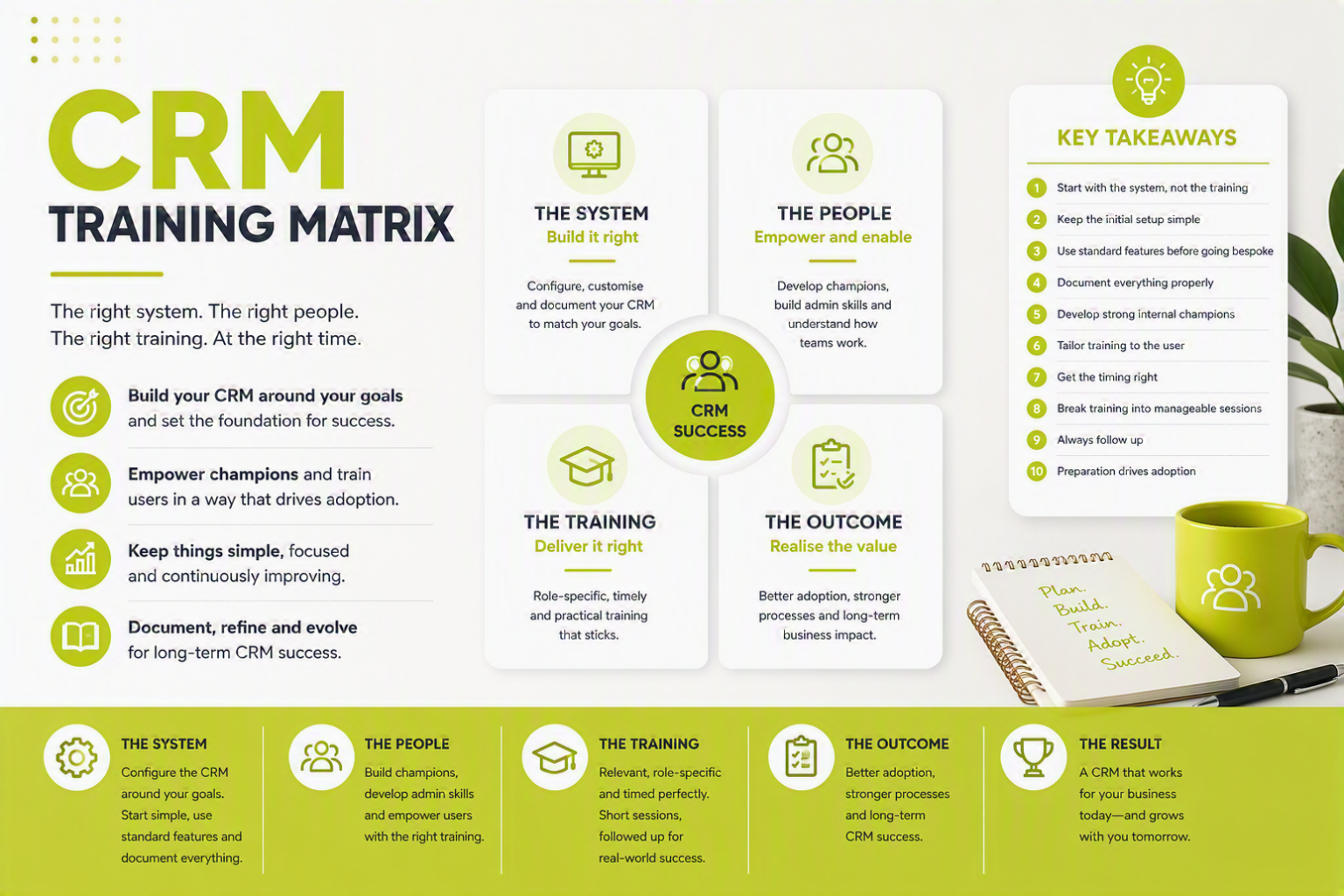
- Start with the system, not the training — Get the CRM configured around your business goals first — training only works if the system is set up properly.
- Keep the initial setup simple — Hide unused features and focus on the essentials to avoid overwhelming users early on.
- Use standard features before going bespoke — Only invest in customisation where it genuinely adds value to your processes.
- Document everything properly — Build an internal knowledgebase so your CRM knowledge isn’t lost as people move on.
- Develop strong internal champions — Train a core group to manage, refine and evolve the system over time.
- Tailor training to the user — Keep sessions relevant to roles and skill levels — avoid one-size-fits-all training.
- Get the timing right — Train users when the system is ready and contains real data, not too early or too late.
- Break training into manageable sessions — Short, focused sessions (around 45 minutes) improve engagement and retention.
- Always follow up — Reinforce learning with a follow-up session once users have hands-on experience.
- Preparation drives adoption — Clear goals, structured setup and focused training are what lead to long-term CRM success.
Understanding the Matrix
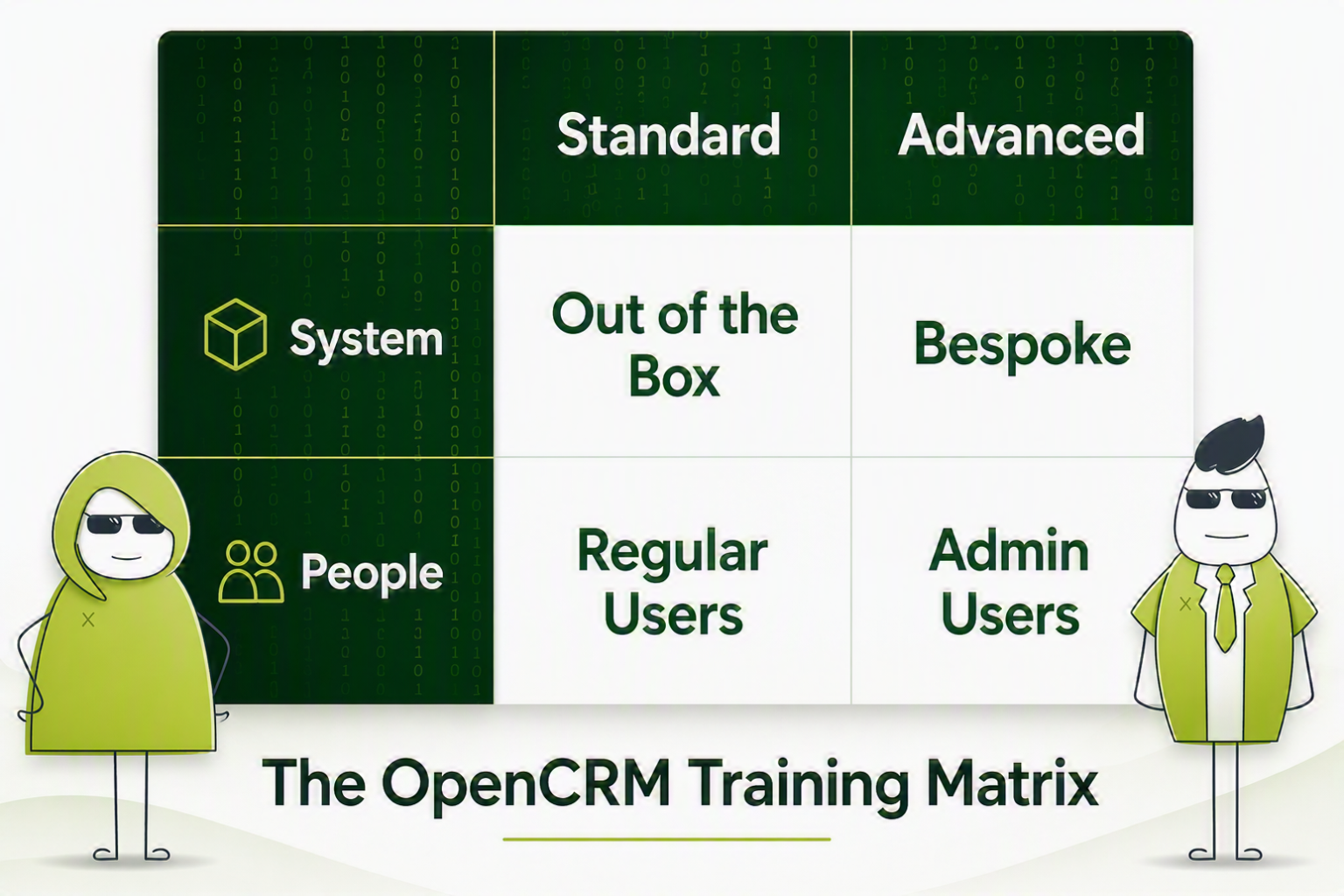
The matrix breaks things down into two core areas: the system itself, and the people using it. Each of these then splits into standard configuration and training, and advanced configuration and training.
Start with the system. Get the build right first, then train users once ready.
Start With the System Setup
Your CRM should be configured around why you bought it in the first place. For example: stop leads slipping through the net, track touchpoints across opportunities, or improve pipeline visibility.
Before anything else, sense-check your setup against these goals. If the build doesn’t support them, the training won’t work.

Do we have what it takes?
We don’t restrict which features you have access to in OpenCRM based on how many users you have. You get everything right out of the box. Click to find out if we’ve got the features you need.
Find out more →Configuring Your Out-of-the-Box CRM
Most CRM providers will give you a knowledgebase, FAQs, and video tutorials. The challenge isn’t access to information — it’s focusing on what matters to you.
Start with the areas you plan to use, such as contact management, sales pipeline, lead conversion, and support ticketing.
Keep It Simple Early On
Modern CRMs are powerful, but that can overwhelm new users. A better approach: hide unused features (don’t delete them), simplify the interface, and introduce functionality gradually.
You can handle a lot of configuration yourself, including custom fields, field visibility, templates, picklists, and permissions.
Making It Yours: Bespoke Configuration
Standard features won’t always be enough; do some research on the elements you might need. Look at data integrations with internal systems, custom reporting, or bespoke search or workflows. This is where your CRM provider adds value — they can translate business needs into system logic, recommend the best approach, and build solutions that fit the core platform.
Document Everything
Bespoke work needs to be documented. People move on — your system knowledge shouldn’t. Make sure you build an internal knowledgebase, capture processes and logic, and protect your intellectual property.
Let us take you on a tour
You’ve had a look around and are starting to think OpenCRM might be the system for you and your business. Why not chat with one of our team (and ask your burning CRM questions) as they take you on a tour of the system?
Find out more →The People Side of the Matrix
To get full value from CRM, you need two distinct groups: system champions (admins and power users), and day-to-day users.
Championing the Cause
Your CRM champions are central to success. They help design the system, support implementation, and manage ongoing improvements. Most importantly, they translate user needs into system configuration.
System Management (Admin Skills)
Your admins will handle backend configuration, reports and dashboards, user permissions, and ongoing system tweaks. As users start working in the system, expect continuous refinement. The goal: ensure teams get real value from CRM.
System Configuration (Joining the Dots)
Admins also need to understand how teams actually use the system. For example: sales teams working in the pipeline, and support teams using helpdesk functionality. You’ll need to balance giving enough information against avoiding overload.
Practical Training Tips for Admins
Keep training practical and efficient: show shortcuts (e.g. duplicating reports/templates), avoid building everything from scratch, and break learning into manageable chunks. These basics make a big difference and help build internal self-sufficiency.
Training Your End Users
Once your system is configured and your champions are ready, it’s time to train your users and avoid common mistakes. Focus on three key areas.
1. Relevance
Training must match the user’s role. Don’t show irrelevant features, tailor sessions by job function, and avoid “one size fits all” sessions. You also need user buy-in — people resist change, so explain clearly why the CRM matters to them.
2. Skill Level
Not all users are equal. Consider new vs experienced CRM users, and technical vs non-technical roles. Split sessions by ability if needed — keep beginners focused on basics, stretch more advanced users. Too easy = disengagement. Too hard = overwhelm.
3. Timing
Timing matters more than most people think. Avoid training before the system is ready, training without real data, or training months before rollout. Otherwise, you’ll end up repeating sessions.
Keep Sessions Short and Focused
Best practice: ~45 minute sessions, clear objectives per session, delivered via screenshare where possible.
Always Do a Follow-Up
Run a follow-up session a few weeks later to reinforce learning, answer real-world questions, and fix issues early. Users will have had time to use the system, identify gaps, and prepare meaningful questions.
Things to Remember
Across all four areas of the CRM Training Matrix, one thing stands out: preparation is everything.
- Know what you want to achieve
- Align your system to those goals
- Train the right people, at the right time, in the right way
Do that well, and your CRM stands a far better chance of long-term success.

Ready to build your training matrix?
See how OpenCRM can support the system and the people side of your rollout.
Start your free trial