
It’s Usually Something Small
A missed follow-up. A duplicated email. A customer who asks the same question twice because the information wasn’t passed on internally.
Individually, these things don’t seem like a big deal. Most businesses recover and move on. But over time they start to add up. Opportunities slip through the cracks. Customer relationships become harder to manage. Team members spend more time searching for information than acting on it.
This is usually the point where a business starts asking how CRM works in a small business, not as a theoretical question, but as a practical way to get more organised and regain control.
Because the reality is that most small businesses aren’t disorganised. They’re simply managing customer information across too many places.
It works for a while. Until it doesn’t.
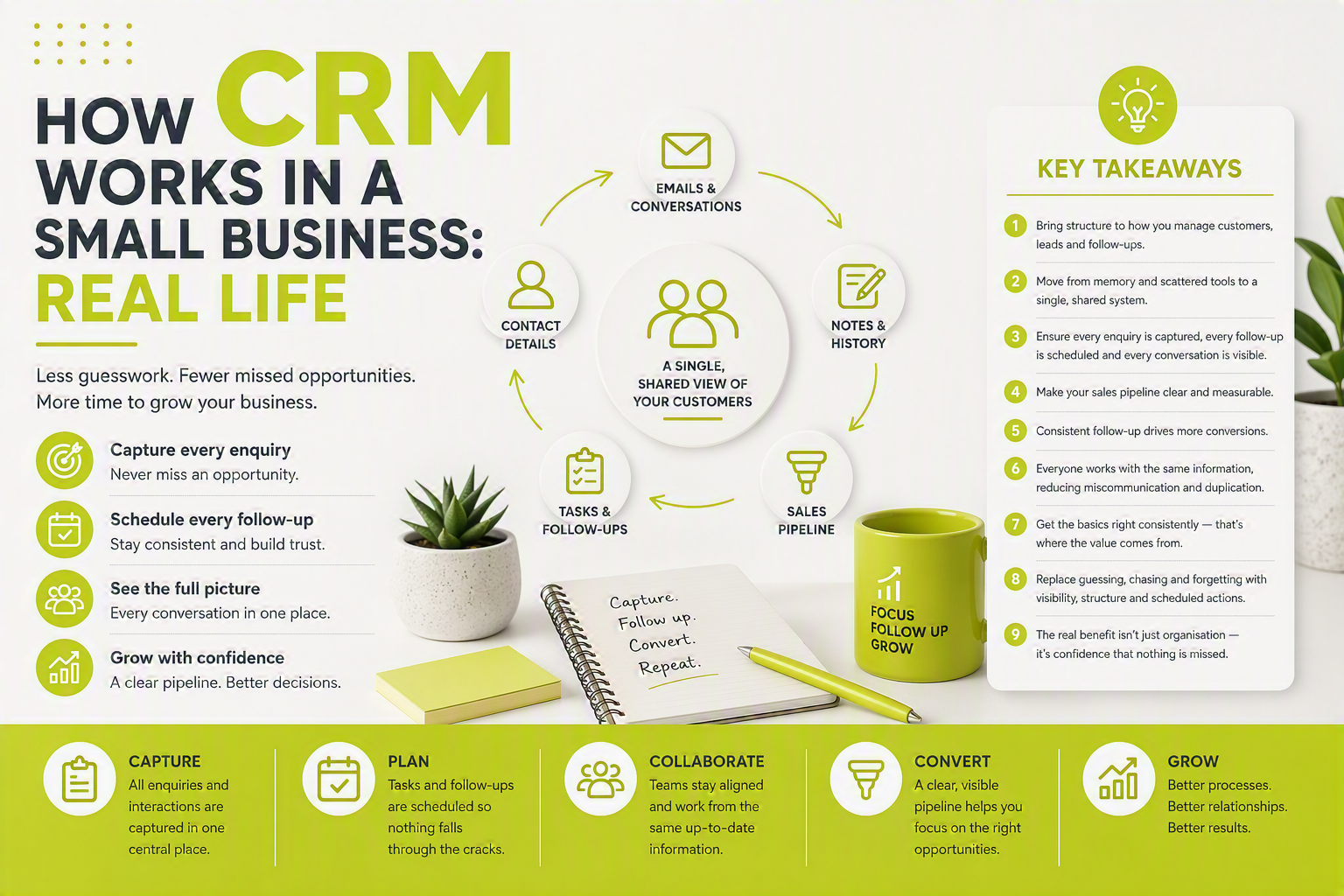
A CRM system brings all of that information together into a single place, creating structure, visibility and consistency across the business.
- CRM is less about software and more about creating a structured way to manage customer relationships.
- It provides a central record of customers, enquiries, activities and communications.
- It helps businesses follow up consistently and reduce reliance on memory.
- Teams gain visibility of sales opportunities, customer history and upcoming actions.
- The result is fewer missed opportunities, better customer service and greater control as the business grows.
Why Small Businesses Reach a CRM Tipping Point
Most businesses don’t wake up one morning and decide they need a CRM. Instead, they gradually reach a point where existing ways of working no longer scale. You may recognise some of these situations:
None of these problems are unusual. In fact, they’re often signs that the business is growing. The challenge is that growth creates complexity, and complexity needs structure. That’s where CRM comes in.
CRM Delivers Measurable Business Benefits
Businesses using CRM software have reported (according to Salesforce):
- Up to 29% increase in sales revenue
- Up to 34% increase in sales productivity
- Up to 42% improvement in sales forecast accuracy
The technology itself doesn’t create these improvements. The real benefit comes from having better visibility, more consistent follow-up, and a clearer understanding of what’s happening across the sales pipeline.
CRM Is About Process, Not Just Software
Businesses that implement CRM often see improvements in sales productivity and forecasting accuracy, but those gains don’t come from the software alone.
They come from replacing memory with process, creating visibility across the team, and ensuring customer follow-ups happen consistently.
In many cases, the biggest improvement isn’t efficiency. It’s confidence that nothing important is being missed.
So, How CRM Works in a Small Business
At its simplest, a CRM replaces scattered information with a single shared system. But in practice, it’s less about software and more about changing how a business manages relationships, sales and customer service. Here’s what typically changes.
Every Customer Interaction Lives in One Place
Without a CRM, information often becomes fragmented. A customer’s email may be in Outlook. Meeting notes may be in a notebook. A quotation might be stored in a separate folder. A task may be sitting on somebody’s desk. When someone needs the full picture, they spend time searching.
A CRM solves this by creating a single customer record that brings everything together. Typically this includes:
- Contact information
- Company details
- Notes
- Emails
- Phone calls
- Meetings
- Documents
- Support activity
- Sales opportunities
Instead of asking, “Where did we put that information?”, the answer becomes, “It’s on the customer record.” That may sound simple, but it can save significant time across an organisation.
Leads No Longer Depend on Memory
One of the biggest problems in many small businesses isn’t generating leads. It’s managing them consistently.
A prospect makes an enquiry. Somebody intends to call them back. They get busy. The follow-up is delayed. The prospect moves on.
In many cases, opportunities aren’t lost because of product quality or price. They’re lost because nobody followed up at the right time.
A CRM introduces process. Enquiries are captured. Tasks are scheduled. Ownership is assigned. Follow-up dates are tracked. Nothing relies solely on memory. The result is a more predictable approach to converting enquiries into customers.
The Sales Pipeline Becomes Visible
Many growing businesses can roughly tell you what’s in their pipeline. Far fewer can tell you accurately. Without a CRM, sales opportunities often exist across emails, spreadsheets and individual conversations, making forecasting difficult.
A CRM creates a structured sales pipeline where opportunities move through defined stages. For example:
Managers can immediately see how many opportunities exist, their value, their stage, their likelihood of closing, and where bottlenecks may be occurring. Rather than relying on instinct, decisions can be supported by real information. This structured approach to sales pipeline management is one of the fastest ways a growing business gains control over forecasting.
Follow-Ups Become Consistent and Predictable
Consistency is often one of the biggest differences between average-performing businesses and high-performing businesses. Most organisations know follow-up matters — the challenge is maintaining that discipline when workloads increase.
CRM helps by creating a repeatable process. Tasks are scheduled automatically. Reminders are displayed. Overdue activities become visible. Upcoming conversations can be planned in advance.
Instead of hoping things happen, the business has a mechanism to ensure they happen — creating a more professional customer experience and often improving conversion rates over time.
Teams Work from the Same Information
As organisations grow, communication becomes more difficult. Sales teams speak to customers. Project teams deliver work. Support teams solve issues. Management reviews performance. Without shared information, each department develops a different view of the customer, creating confusion and frustration for both staff and customers.
A CRM provides a common source of information. Sales can see project activity. Support can understand the customer’s history. Management can view customer interactions across the organisation. Everyone works from the same version of the truth — resulting in smoother handovers, better communication and a more consistent customer service CRM experience.
How Different Teams Use CRM
Most examples of CRM in action lean towards sales — enquiries, pipelines, forecasts, opportunities. But a CRM typically supports the whole business, not just the sales team.
A Typical Day Before and After CRM
A prospect submits an enquiry.
The email arrives in an inbox.
Some notes are written on paper.
A quotation is saved in a folder.
A reminder is made mentally.
A week later someone asks for an update. Nobody is quite sure what happened next.
The enquiry is recorded automatically.
The prospect enters the sales pipeline.
Follow-up activities are scheduled.
Emails are linked to the customer record.
The opportunity remains visible until a decision is reached.
Management can see progress at any point.
The difference isn’t necessarily working harder. It’s having a system that supports the process.
What Improvements Do Businesses Typically See?
While every organisation is different, businesses commonly report improvements in:
Importantly, CRM doesn’t create success on its own. What it does is provide the structure that allows good processes to be followed consistently.
CRM Doesn’t Replace Your Existing Tools
A common misconception is that implementing CRM means replacing everything else. In reality, CRM often works alongside the systems a business already uses. For example:
The CRM becomes the central hub for customer information while allowing teams to continue using the tools they already know. If Microsoft 365 is core to how your team works, a Microsoft 365 CRM integration brings Outlook, Teams and customer data even closer together.
For many UK businesses, CRM works best when it integrates with the tools teams already use every day. OpenCRM integrates with Microsoft 365, Outlook, Teams and a wide range of business systems, helping organisations improve visibility without forcing staff to change the way they work.
What CRM Is Not
Given how broadly the term gets used, it’s worth being clear about what CRM isn’t. CRM is not:
Why CRM Often Becomes a Growth Platform
In the early stages of a business, knowledge lives in people’s heads. That can work surprisingly well. But as the organisation grows, relying on memory becomes increasingly risky. New staff need information. Managers need visibility. Customers expect consistency.
A CRM creates a framework that allows customer relationships to be managed at scale — without losing the personal touch that got the business here in the first place.
New employees can quickly understand customer history. Managers can monitor performance. Teams can collaborate more effectively. Customers receive a more joined-up experience. This is why CRM adoption and a well-planned CRM implementation are often viewed as far more than a database rollout. It’s a platform that helps a business grow without losing control.
The Real Benefit: Confidence
The biggest impact of CRM isn’t actually technical. It’s psychological. You stop wondering:
Instead, the answer is already in the system. That removes a level of background stress that many business owners experience without ever really acknowledging it.
The result is greater confidence.
Confidence that customers are being looked after. Confidence that opportunities aren’t being missed. Confidence that the business can continue to grow without becoming harder to manage.
Frequently Asked Questions
What does CRM stand for?
CRM stands for Customer Relationship Management. The term can refer to both the strategy of managing customer relationships and the software used to support that process. Read more in our guide to what is CRM.
Do small businesses really need CRM?
Not every business needs CRM on day one. However, once customer information starts becoming difficult to manage across multiple systems, a CRM for small businesses can help improve visibility, consistency and control.
Is Excel a CRM?
Spreadsheets can be useful for storing information, but they don’t provide structured follow-up management, activity tracking, pipeline visibility or collaboration in the same way as a dedicated CRM.
When should a business implement CRM?
Typically when customer information is becoming difficult to manage, opportunities are being missed, or growth is beginning to create operational challenges.
How long does CRM take to implement?
Implementation varies depending on the size and complexity of the business, but many small businesses can start seeing value quickly when the focus is on solving practical day-to-day challenges rather than attempting to transform everything at once. Learn more about planning your CRM project.
What is the difference between CRM and ERP?
CRM focuses on managing customer-facing relationships, communication and sales activity. ERP focuses on internal operations such as finance, stock and resource planning. Some businesses use both, connected together.
Can CRM integrate with Microsoft 365?
Yes. Most modern CRM systems, including OpenCRM, integrate with Outlook, Teams and the wider Microsoft 365 ecosystem, so staff can keep working from the tools they already use.
What information should be stored in CRM?
Typically contact and company details, communication history, sales opportunities, support activity, documents and any notes relevant to the relationship — anything needed to answer “what’s the full picture on this customer?”
What happens if we don’t implement CRM?
Nothing happens immediately. But information stays scattered across inboxes, spreadsheets and memory, and the problems that come with growth — missed follow-ups, duplicated work, limited visibility — tend to get harder to manage over time rather than easier.
How much does CRM cost?
Costs vary widely by provider, user numbers and functionality required. Many providers, including OpenCRM, offer per-user pricing with no long-term contract, so it’s worth comparing based on what’s actually included rather than the headline price alone.
Next Steps
Understanding how CRM works is often the first step. The next question is whether your business has reached the point where better visibility, stronger processes and more consistent customer management would make a difference.
If you’re finding that information is becoming harder to manage, follow-ups are increasingly difficult to track, or growth is creating operational strain, it may be time to look at how CRM can help bring everything together.
Not sure if you’re ready for CRM? If you’re currently managing customers across spreadsheets, Outlook, Teams and notes, a short conversation can often help identify whether CRM would deliver genuine value to your business.
Continue Learning About CRM

Want to work out how this applies to you?
No pressure — book a Discovery call so we can uncover the areas where CRM might help.
Book Discovery call