
Start with the goal, not the settings
A goal-first CRM implementation shouldn’t begin with fields, workflows or reports. It should begin with what you want the business to do better.
That thought was prompted by an article from our customer Anatomical Concepts UK, who work in rehabilitation technology. Clinicians using the devices they work with face a long list of programmes, and their advice is to decide what the client should be able to do by the end before touching a single parameter. The field is different. The trap is the same: flexible tools reward you for knowing what you want and punish you for not knowing, and a CRM is about as flexible as business software gets.
In this article we’ll look at why starting with settings goes wrong, and share a five-step method for building a goal-first CRM instead. It’s how we approach every CRM implementation: start with the goal, then configure.
- A CRM implementation should begin with what you want the business to do better, not with fields, workflows or reports.
- Five steps turn that into a configuration: outcome, problem, job, trigger and measure.
- A measure needs a baseline to show whether things have improved, and a target to show whether you’ve achieved what you set out to do.
- Start manually when a process is new, then choose scheduled or event-based automation according to what should cause the action.
- Your first goal can be provisional. Configure the smallest useful version, measure it and adjust.
 Click to enlarge
The menu problem
Open the setup area of a capable CRM and you’ll find a long list of choices: fields, record types, pipelines, stages, workflows, reminders, dashboards, reports, permissions, templates. That range is encouraging. It suggests the system will bend to fit the way you work, and it will.
It’s also why plenty of teams stall. With a business to run, the natural move is to reach for something familiar: a template, a copy of someone else’s setup, or a decision to switch on everything just in case. Sometimes that fits. Often it’s a feature in search of a problem. You can hear the difference in the question being asked:
“The CRM has workflows. What can we automate?”
The result is activity: fields filled in, rules running, reports generated, and no clear idea of what any of it was meant to change.
“We’re losing enquiries because nobody owns the next action. What should the CRM do about that?”
The result is a specific change, a way to check it worked, and a reason for every setting you touch.
What happens when settings come first
In our experience, starting with features rather than outcomes often produces a CRM that is technically correct but commercially vague. Records are created, reminders fire, reports run, and nobody can say quite what has changed. You may recognise some of these:
Three things we often see
- The system and the work drift apart. Data gets entered, but it isn’t tied to anything the team is trying to achieve.
- Progress is hard to see. Without a goal there’s no obvious measure, so it’s difficult to know when to change something or stop.
- Confidence drops. People who aren’t sure why a setting exists are reluctant to touch it, so the CRM stays the same year after year.
None of this is a fault in the software. It’s what happens when the software is asked to supply the plan.
The five-step method for a goal-first CRM implementation
Work through these in order. The configuration comes last, almost as a consequence. Together they form a chain:
Outcome: what do you want to happen?
Decide what should be different for your customers, your team or the business. Name it in plain language, and make it one the people doing the work would recognise as their own: “reply to every enquiry within one working day”, “see next quarter’s renewals at a glance”, “pick up a colleague’s customer without a handover meeting”.
Problem: what’s stopping that happening today?
Watch the work as it really happens. Is the problem getting information in, finding it again, knowing who owns the next step, remembering to follow up, or seeing the overall picture? The answer tells you what the CRM needs to address, and it’s often not what you assumed.
Job: what does the CRM need to do?
A CRM can play several different roles. Pick the main one for this goal; many goals will combine more than one.
Record captures information once, in one place. Prompt nudges the right person at the right moment. Route puts work in front of the right owner. Connect links email, calendar, accounts and other tools so the picture is complete. Report shows what’s happening so decisions rest on evidence.
Trigger: what should make it happen?
Every job starts for a reason. For most CRM processes, the trigger falls into one of three useful categories.
Someone decides. Suits new or uncertain processes, where you want to learn how things really work and apply your own judgement.
A date or time arrives. Suits routine, repeatable work such as renewal reminders or a weekly pipeline review.
Something happens, such as a form submission or a status change. Suits work that must never depend on someone remembering.
New or uncertain processes often benefit from starting manually. Once you understand the pattern, the right next step might be scheduled or event-based automation, depending on what should cause the action.
Measure: how will you know it’s working?
Choose the measure before you configure anything, and write down three things: where you are now, where you want to be, and when you’ll review it. A measure needs a baseline to show whether things have improved, and a target to show whether you’ve achieved what you set out to do.
Only now do you configure the fields, stages, workflows and reports, and each one has a reason to exist.
A worked example: enquiries that go cold
Imagine you run a small professional services firm, and you want to stop losing website enquiries.
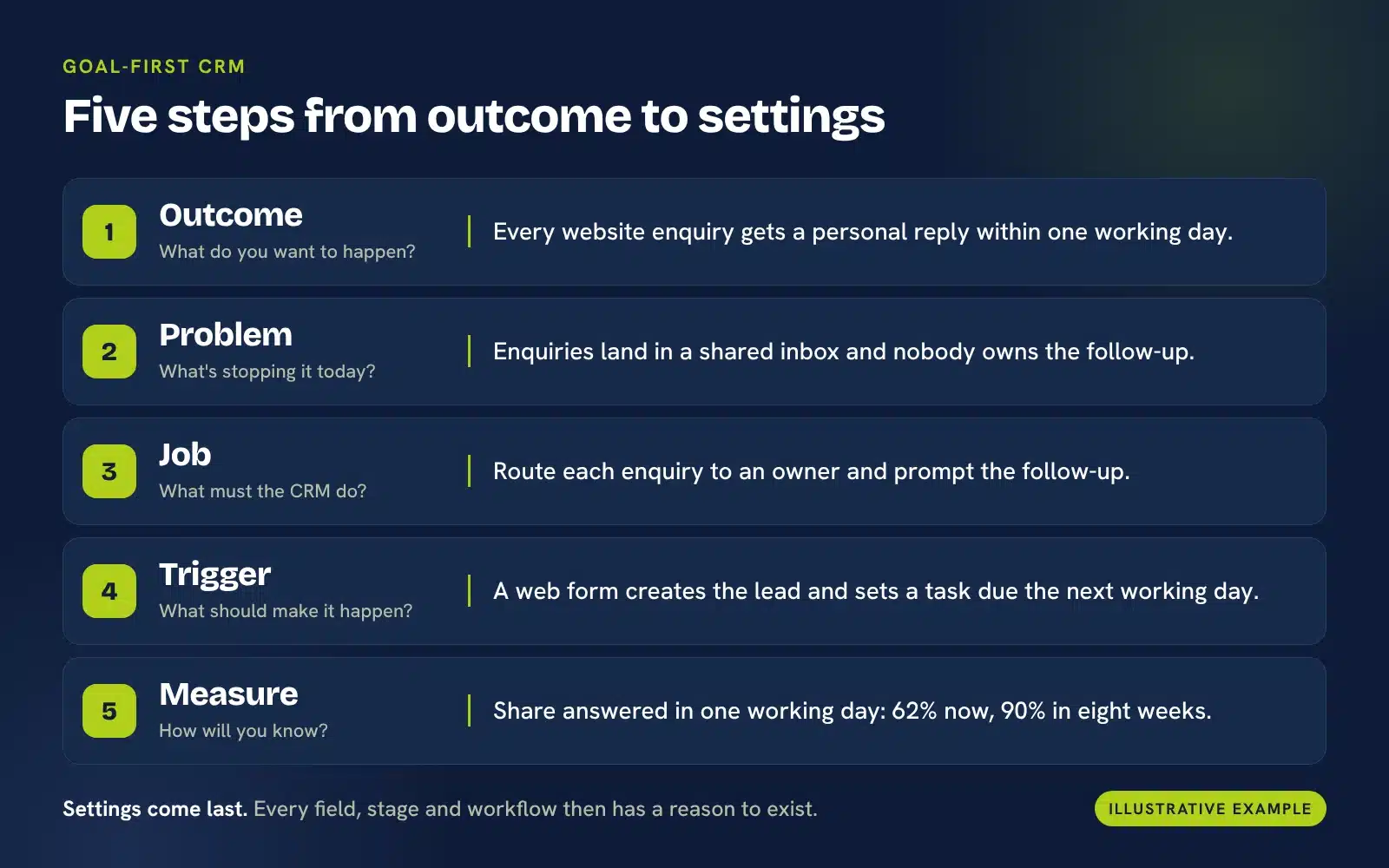
Outcome. Every website enquiry gets a personal reply within one working day.
Problem. Enquiries land in a shared inbox, whoever sees one first replies, and some wait three days. Nobody owns the follow-up after the first reply.
Job. Route each enquiry to an owner, and prompt the follow-up.
Trigger. A person to begin with: one colleague assigns enquiries for a couple of weeks to learn the real pattern. Then a web form creates the lead, assigns an owner and sets a task due the next working day.
Measure. The share answered within one working day. Baseline 62%, target 90% within eight weeks.
Review. Check weekly, and look into anything older than two working days.
Each step in the progression has a reason, and the order was planned before anything was built:
If your outcome were keeping clients at renewal instead, the same CRM would be set up quite differently, and that’s the point.
Goal-first doesn’t mean perfect planning
A fair objection is that you may not know enough at the start to set the right goal. That’s true, and you don’t need to. Your first goal only needs to be useful enough to test, and a good CRM provider can help you match what’s going wrong to the features that matter.
Your first goal can be provisional. Configure the smallest useful version, watch what happens, measure it and adjust.
We’ve found that when teams understand why a field, stage or automation exists, it’s easier to train people, challenge unnecessary data collection and adapt the system later. A goal that changes after the first few weeks isn’t a failure of planning. It’s the method working.
Same CRM, different goals
Here are some common goals, the job the CRM does for each, what triggers it and how you might measure it. Treat them as starting points rather than fixed rules.
Job: Route and prompt
Trigger: A new enquiry arrives
Measure: Share answered within one working day
Job: Record and report
Trigger: An opportunity is updated, then reviewed weekly
Measure: Forecast against actual
Job: Prompt
Trigger: A renewal date approaches
Measure: Renewal rate
Job: Route and record
Trigger: A new case is logged
Measure: Time to resolution
Job: Prompt and report
Trigger: No activity for a set number of days
Measure: Share of open opportunities with a future action
Job: Report
Trigger: Month end
Measure: Report ready without manual rework
If you’ve identified several goals, don’t start with the easiest feature to configure. Start with the outcome that matters most to the business and where the current process is causing a measurable problem. Weigh three things: the business impact, how often it happens, and how easily you can measure it.
How we approach goal-first CRM at OpenCRM
Because OpenCRM doesn’t use feature tiers, our starting question isn’t “which package do you need?” It’s “what are you trying to achieve?” Only then do we decide which parts of the system you actually need to use.
So we begin with conversation rather than configuration, and leave the rest of the system until you need it. Our guide to planning your CRM project shows how that works in practice, and our CRM implementation advice goes into more detail.
Write this down before you configure anything
The method only works if you use it, so here it is as a five-line exercise. Complete it for one goal.
Frequently asked questions
What does a goal-first CRM approach mean?
It means deciding what you want your team to be able to do, and how you’ll measure it, before you configure any fields, stages, workflows or reports. The settings then follow from the goal instead of the other way round.
Do we need to understand every CRM feature before we start?
No. You need to understand your goal and where your current process breaks down. A good CRM provider will help you match that to the features that matter, and the rest can wait until you need it.
How many goals should we start with?
Start with the smallest number that lets you solve a meaningful business problem. For a first implementation, that may be a single outcome. Add others once you can show the first one is working.
Should we automate everything from day one?
Usually not. Running a new process manually for a few weeks shows you how it really works. Once you understand the pattern, you can choose scheduled or event-based automation depending on what should cause the action.
How do we know whether our CRM is working?
Measure the goal you set at the start, such as time to first reply, the share of opportunities with a next action, or renewals handled on time. Record a baseline and a target before you configure anything, then review the number regularly. If it isn’t improving, that tells you what to change. Our guide to sales opportunities and CRM has more on tracking what matters.
What if our goals change?
Then the configuration should change too. A goal-first approach makes this easier because you know why each setting exists, so you can see what to adjust, what to keep and what to retire.
Next steps
If your CRM feels like a long list of options rather than a tool for getting something done, start with the worksheet above and write down one outcome. If you’d like a second pair of eyes on it, we’re happy to talk it through.

Want to work out what your CRM should be for?
No pressure — book a Discovery call so we can uncover the areas where CRM might help.
Book Discovery call